


If you’re running traffic, managing accounts, testing landing pages, or warming up domains – you need a server that stays stable. And you also need support that’s always ready to help.
LikeVPS LikeVPS – a VPS hosting provider with servers in 35+ countries that fits common arbitrage tasks. In this article, we’ll break down how well the service matches specialists’ needs.
From this article you’ll learn:
- Is it true that LikeVPS matches typical media buyer needs? Is it worth using their service?;
- How to choose configurations that can handle the required workload?;
- How to avoid overpaying and pick a plan for a specific task?;
- Does their support actually help with setup, or is it just a chatbot?;
- How to get a 10% discount with the promo code new_dev10?.
First, let’s briefly talk about why a VPS is relevant for a specialist.
Straight to the point: why do you need a VPS instead of regular hosting?
Why the entire setup depends on the server
You can invest in creatives, warm up accounts, and test funnels, but all the work starts with choosing the server. This is where the tracker and redirects run, along with the flow logic. If it lags or the IP has a history, issues will quickly affect the entire funnel. 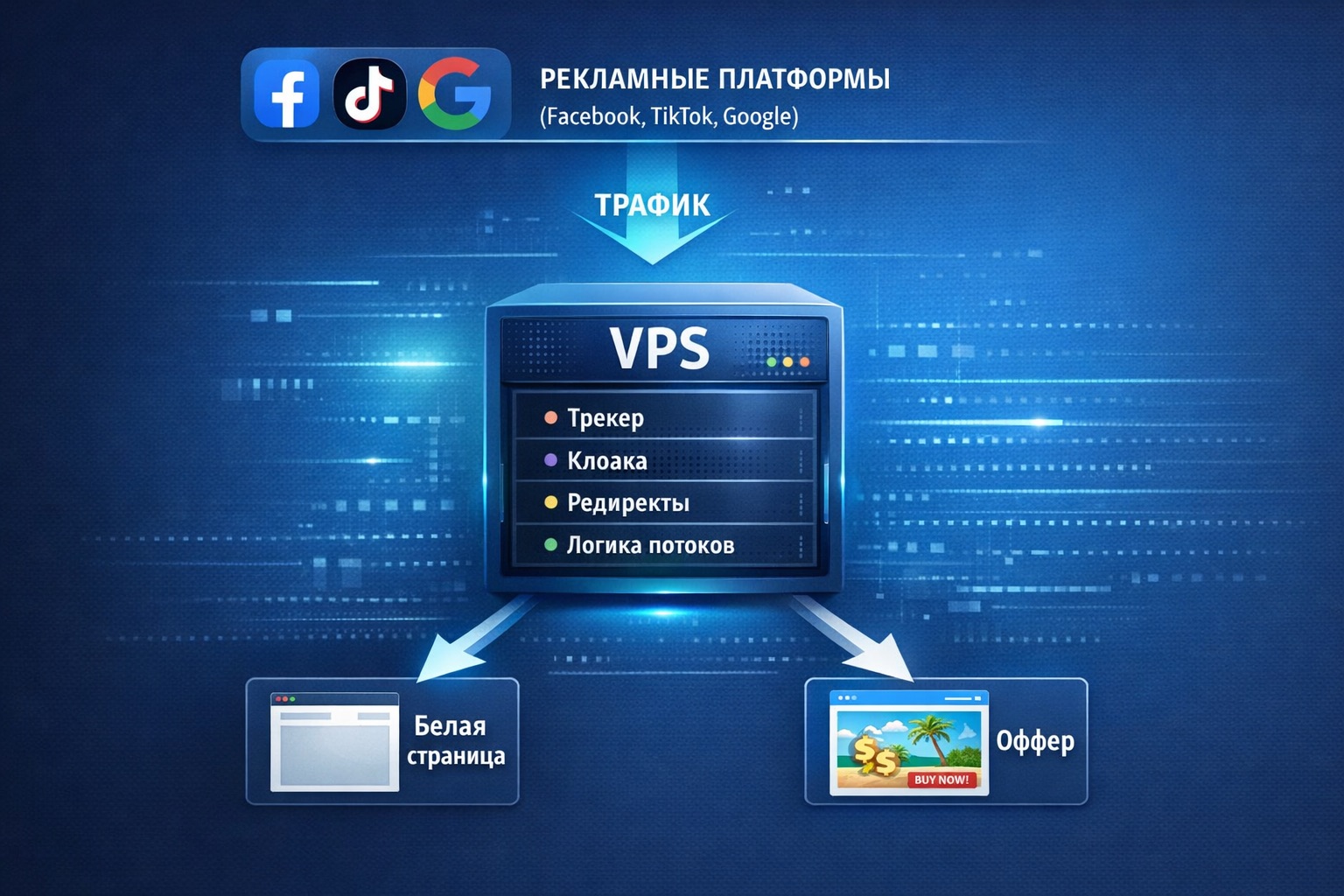
Any arbitrage setup is a system of multiple elements. Flows, auto-launch, trackers, farming, postbacks, anti-detect browsers, and anti-block tools all work together. When one element slows down, it impacts the rest.
That’s why arbitrage teams expect not “high speeds” from a VPS, but a specific checklist:
- a clean dedicated IP;
- stable performance under the load of browsers and flows;
- a port without speed limitations;
- support that actually helps when something goes down.
Now let’s answer the question: why do I specifically need a VPS and not regular cloud hosting?
Why you need a VPS and not regular hosting
Media buyers don’t always treat saving money as the main goal. Many simply don’t understand: why overpay for a VPS if you can get hosting for a couple of dollars?
The answer is simple.
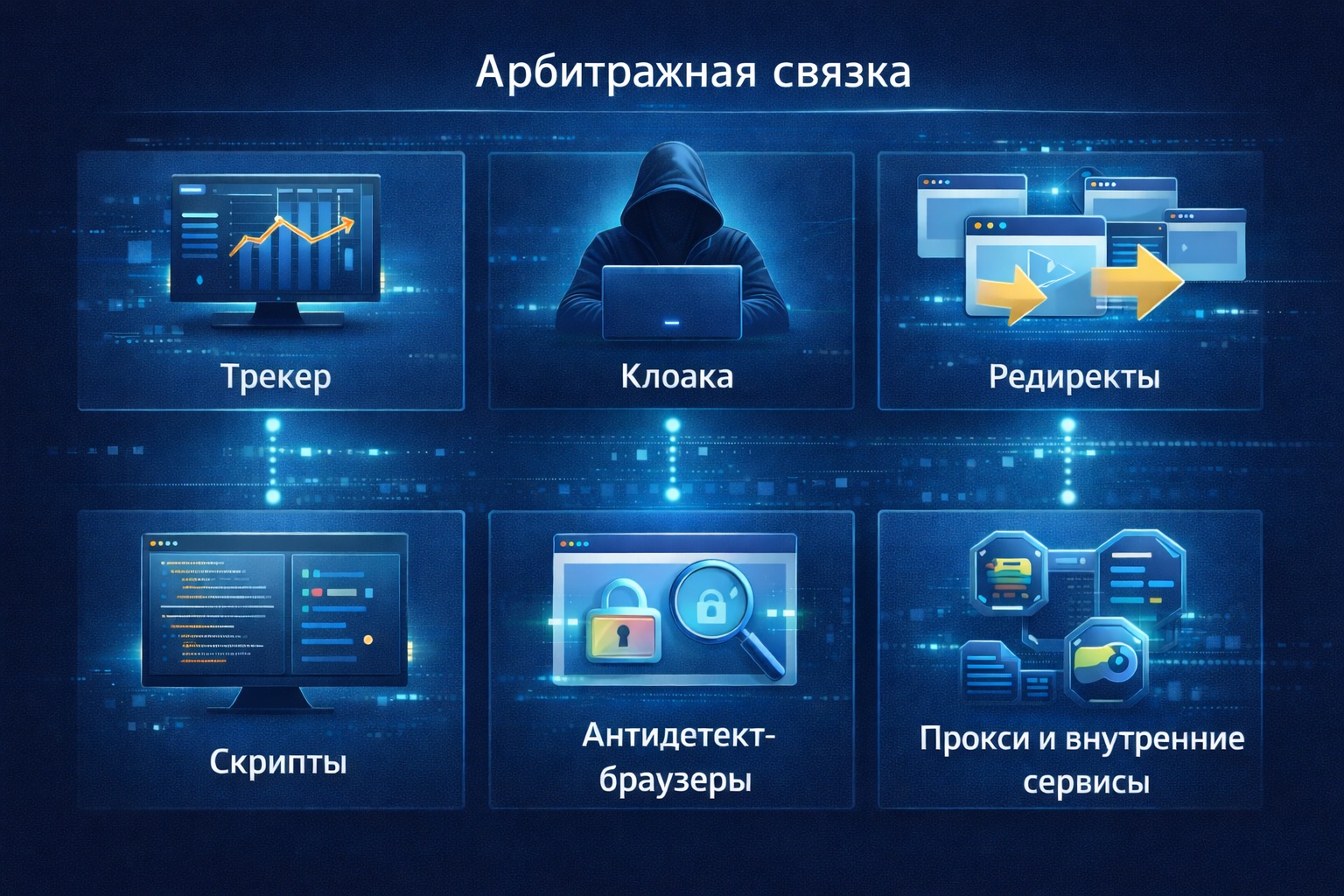
Yes, regular hosting is enough for a simple business website, but an arbitrage setup is more complex and requires more resources. It runs multiple components at the same time:
- a tracker;
- redirects;
- scripts;
- anti-detect browsers;
- proxies or internal services.
You can’t run this kind of system on regular hosting for three reasons.
1. No root access
On shared hosting, you don’t control the server.
You can’t:
- install required libraries;
- configure a firewall;
- deploy your own services;
- work with Docker or custom builds.
In arbitrage, this is critical because every setup requires its own logic and stack.
2. Load limits
On regular hosting, resources are shared across hundreds of websites.
As soon as traffic grows, redirects increase, a tracker starts, or scripts spin up – hosting begins throttling processes or simply disables the site for “exceeding resource limits.”
In arbitrage, that equals:
- lost clicks;
- broken postbacks;
- a burned funnel.
3. You can’t scale properly
A setup constantly changes:
- today it’s one flow;
- tomorrow it’s ten;
- next week it’s full-scale launching.
On hosting, you can’t add resources whenever you need them.
Most often you have to:
- move to another plan;
- migrate everything manually;
- deal with downtime.
Now let’s check whether LikeVPS covers these needs.
Does LikeVPS match a media buyer’s VPS requirements
So. We identified three key requirements a media buyer has for a server:
- Root access.
- The ability to handle load.
- The ability to scale at any moment without losing a built setup.
Let’s see how LikeVPS performs on these points.
What about root access at LikeVPS
With LikeVPS, you rent a full VPS with root access. That means the server is completely under your control.
How it works:
You found an offer, prepared creatives, launched a test flow. Traffic is coming in, and you need to quickly deploy a tracker and configure redirects to start routing clicks.
- You rent a VPS. You get a server with root access and build the setup the way you need. You install a clean system, deploy a tracker in Docker, configure redirects and the firewall, connect a domain – and within an hour you have working infrastructure for the offer.
- A few days later, the setup changes. You need to add another redirect, run a new script, or test different routing logic. On hosting, you hit limits again. On a VPS, you just log in, install what you need, and continue – without switching plans and without endless chats with support.
That’s the difference.
A VPS is a work machine where you build your own infrastructure for your funnel.
A typical server setup looks like this:
- Install clean Ubuntu.
- Deploy a tracker using an install script.
- Deploy the tracker in Docker.
- Configure the firewall for the required ports.
- Connect a domain and postbacks.
On regular hosting, this scenario is either impossible or heavily limited. On LikeVPS VPS plans, it’s basic functionality.
Moving on. What about the ability to handle load?
Can LikeVPS provide hardware that can handle different configurations?
Of course – with LikeVPS, the server is allocated to one user. The resources listed in the plan are reserved for your VPS and are not shared with other users.
Even on basic configurations:
- NVMe drives are used;
- a 10 Gbps port is available;
- a dedicated IPv4 is provided.
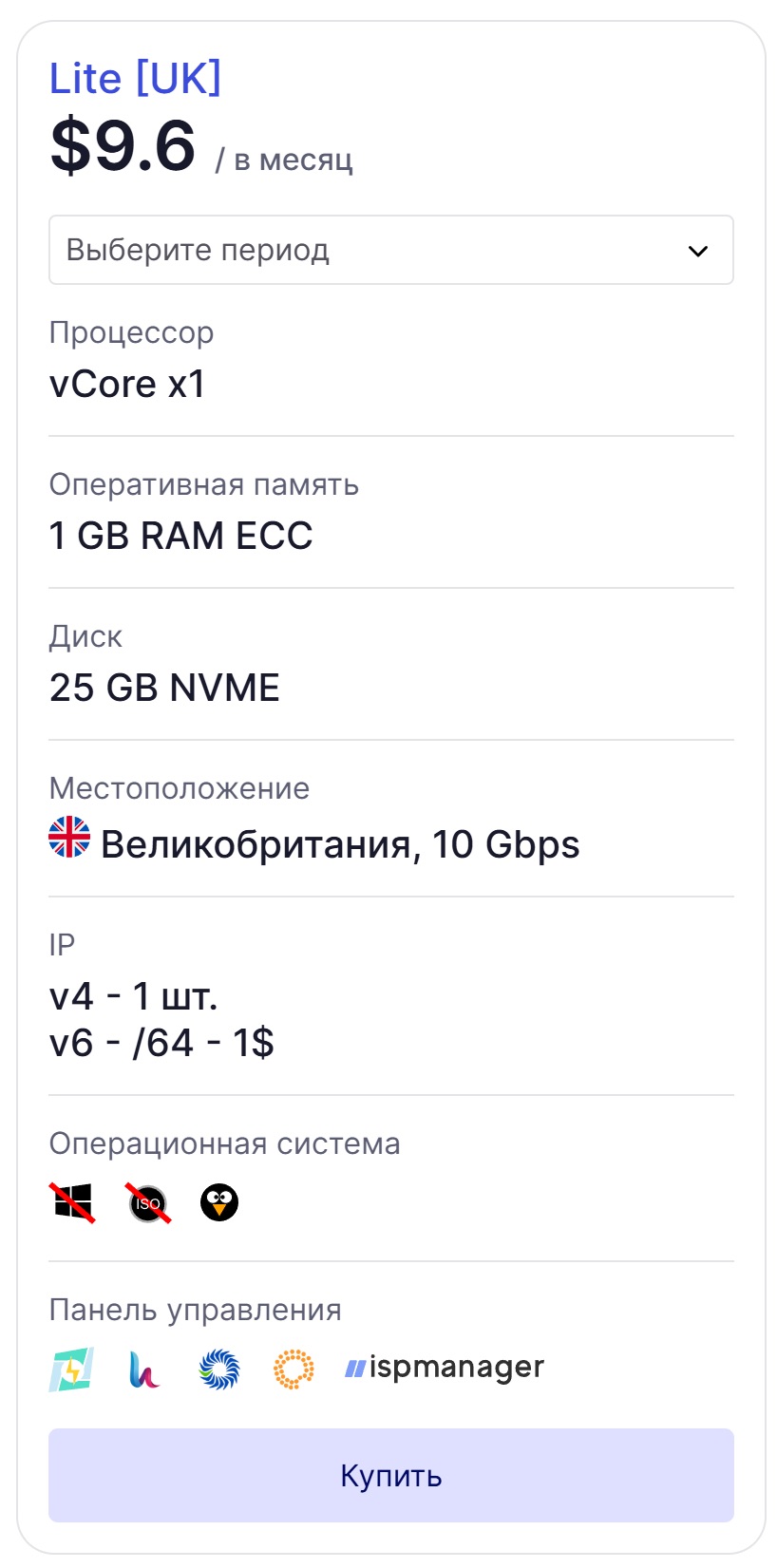
Illustration 3. Example of a basic plan configuration on LikeVPS
This means the server is designed for consistent load:
- traffic redirects;
- tracker operation;
- scripts and background processes;
- anti-detect and proxy services.
If the load grows, you upgrade to a stronger plan – without “neighbors on shared hosting” and without sudden shutdowns for exceeding limits.
Can I scale on LikeVPS without pain
Yes, and the service emphasizes this capability. A setup can start with one flow and reach dozens within a week.
With LikeVPS, this is handled without migrations: you can upgrade from Lite to Like+ or Like++ or higher and simply add resources.
Your configured infrastructure won’t be affected! You can scale it as the setup grows:
- Start with the basic Lite for $11.4 – and run one or two setups.
- Need more load capacity – choose Like++ and comfortably run flows, the tracker, and internal services.
And so on…
The server is deployed in 10–15 minutes. If you need a VPS for arbitrage, you can also request a custom configuration outside standard plans – support will help you set everything up.
As a result, the server becomes a predictable foundation you can build on and scale safely.
Next, we’ll break down how to choose plans for your tasks.
How to choose configurations that can handle your workload
VPS resources should match the task. A common mistake is picking the cheapest plan, installing an anti-detect browser, a tracker, and auto-launch, and then wondering why everything lags.
It’s better to start from the task, not the plan.
Here’s how to ориент yourself:
VPS with fast deployment
In arbitrage, you often need to deploy a server “right now”:
- the setup takes off;
- the offer is available for a couple of days;
- you need to quickly test a new country.
If server deployment takes a day, that’s unacceptably slow.
With LikeVPS, it’s done in 10-15 minutes:
- Log into the panel.
- Choose the country and plan.
- Pay.
- In 10–15 minutes, you receive SSH access by email.
Next:
- Install the tracker.
- Configure redirects.
- Launch the flow.
The entire cycle – from payment to a working server – takes less than an hour.
VPS for multi-landing
Multi-landing means using multiple landing pages for one offer:
- for different audience segments;
- for different creatives;
- for different geos.
This setup increases server load. Because it involves:
- lots of files;
- frequent redirects;
- parallel flows.
That’s why:
- Choose a VPS with 2–4 cores and 4 GB RAM. For example, Lite++ or higher.
- Install Nginx or Apache.
- Place multiple landing pages in different folders.
- Configure redirects via a tracker or a script.
- Test response from different countries.
With NVMe drives, landing pages load faster, which means fewer losses at the page load stage.
VPS for trackers
The tracker is the brain of the setup:
- counts clicks and conversions;
- manages flows;
- sends postbacks.
If the tracker is slow:
- stats are delayed;
- you optimize too late;
- money leaks.
Minimal tracker setup:
- 2–4 cores;
- 4–8 GB RAM;
- NVMe disk.
The Lite++ plan works for this.
How a server is usually deployed:
- Rent a VPS in the required geo. LikeVPS has 35+ locations to choose from.
- Install the tracker (via an install script).
- Connect a domain.
- Configure postback.
- Launch a test flow.
You can keep this server separate from the launching part so the load doesn’t affect stats.
Scalable VPS
An arbitrage setup never stays still:
- today it’s 1 flow;
- tomorrow 20;
- next week – full-scale launching.
If you can’t upgrade the server quickly, the pain begins:
- data migration;
- downtime;
- reinstalling software.
A normal scaling scenario:
- Start with the Lite plan.
- The setup takes off – upgrade to Like+.
- Volume grows – upgrade to Like++.
The server stays the same – it simply gets more resources.
Looking for custom?
Message support. They’ll build a configuration for your task – whether you need GPU or 64 GB RAM.
Here’s how it works. Example request to support:
– Guys, I need a server for tracker + auto-launch. I’m thinking about 4 cores, but I’m not sure if it’ll be enough.
– How many flows do you plan to run simultaneously?
– Around 20–30 at the start.
– Better take a config with 6 cores and 8 GB RAM. For example, the PRO++ plan. You’ll have headroom for peaks. If you see you don’t need that much – you can downgrade the plan anytime without migrating.
In 10 minutes, the server is already deployed with the required configuration.
This format is convenient when your setup is нестандартная: you can simply describe the task and get a server built for it – without long back-and-forth and reinstallations.
If you decide to try the service, you can apply the promo code right away and get a 10% discount on your first order. It works for all plans and countries.
Here’s how to rent a VPS and use the discount:
- Go to LikeVPS.net LikeVPS.net
- In the menu, select “VPS/VDS Server”. Choose the required location. For example, the Netherlands, the USA, Poland.
- You’ll be taken to the plans section. Choose the required configuration and click “Buy”.
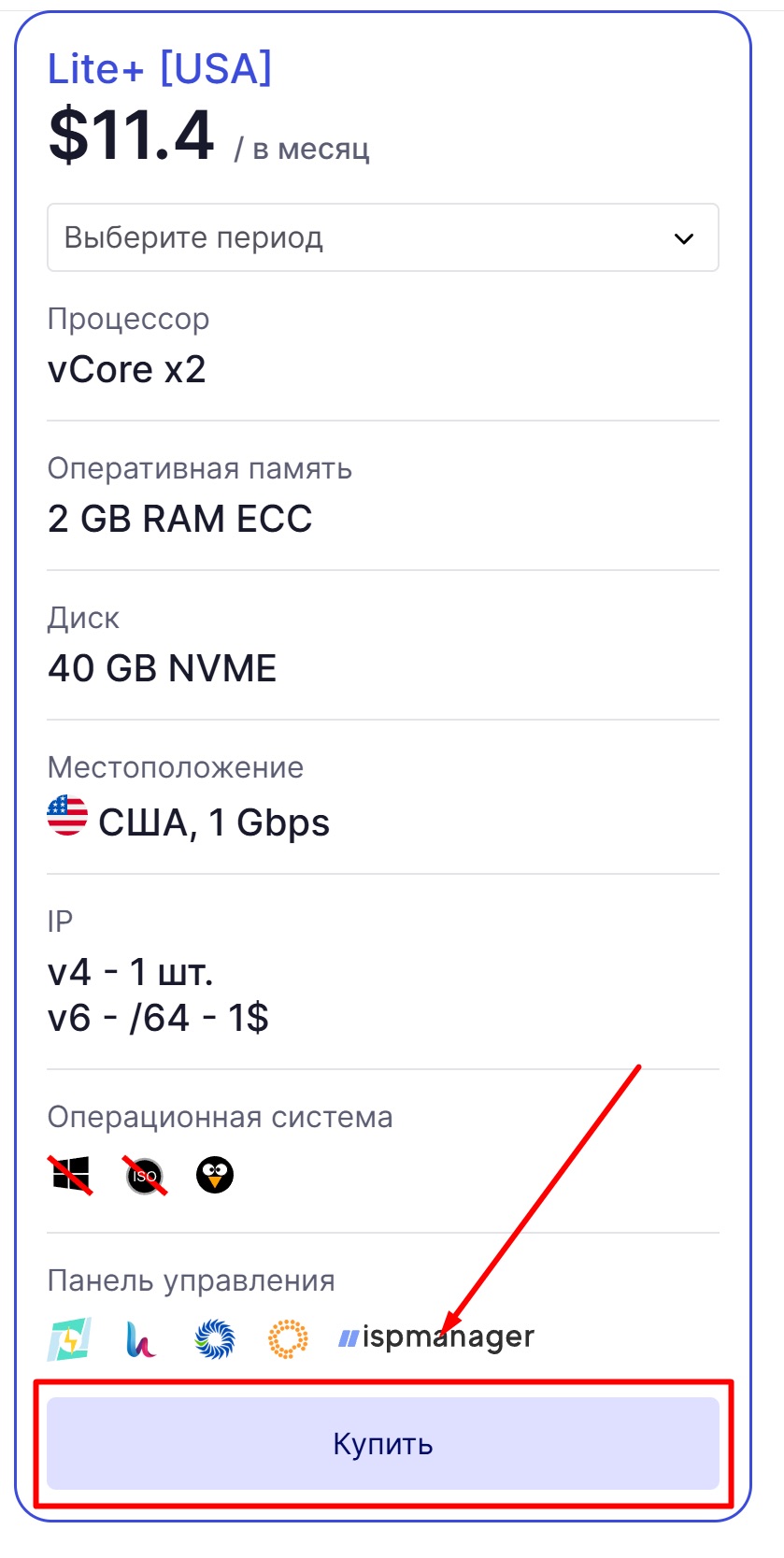
- You’ll be redirected to the order setup and payment page. Click “Add to cart”.
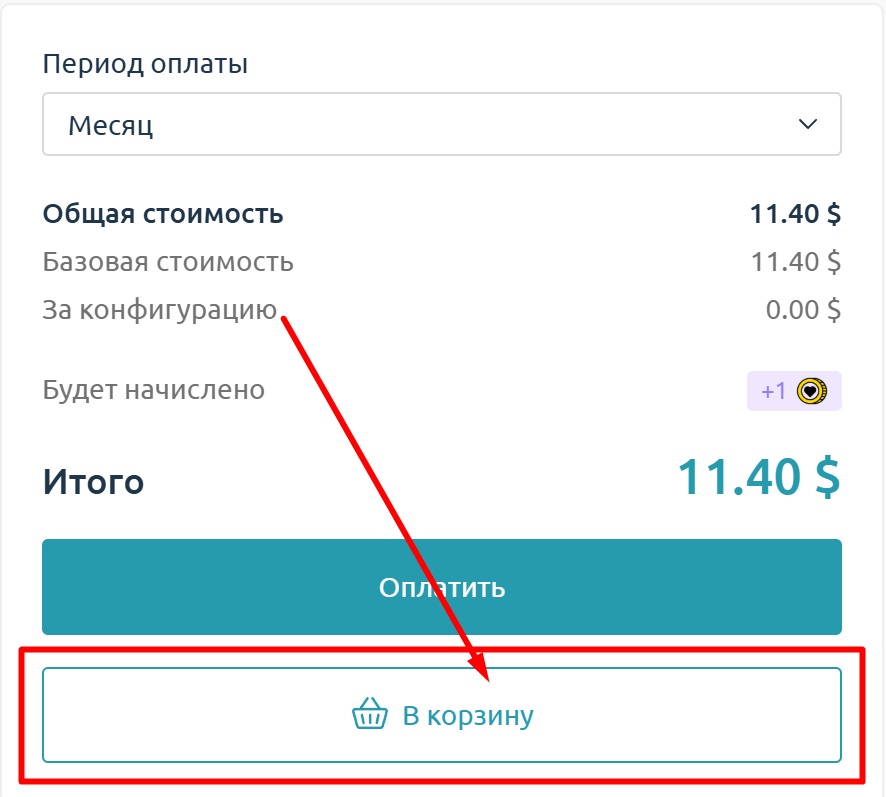
- On the next page, choose “Proceed to checkout”.
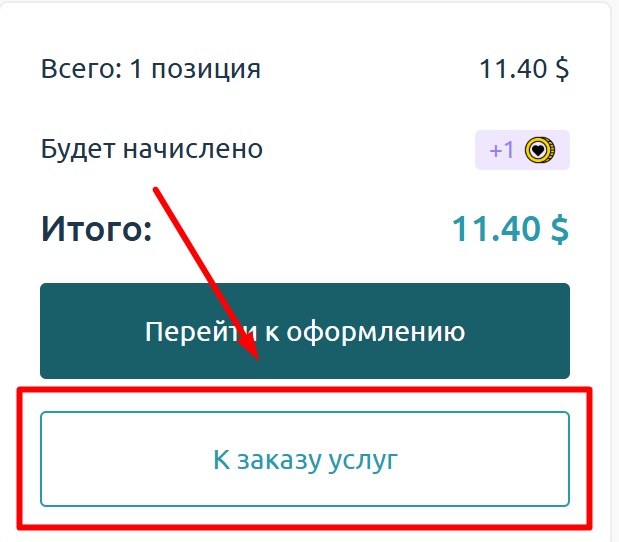
- Next, choose the payment method and click it.
- On the next page, you can enter the promo code new_dev10 and get 10%.
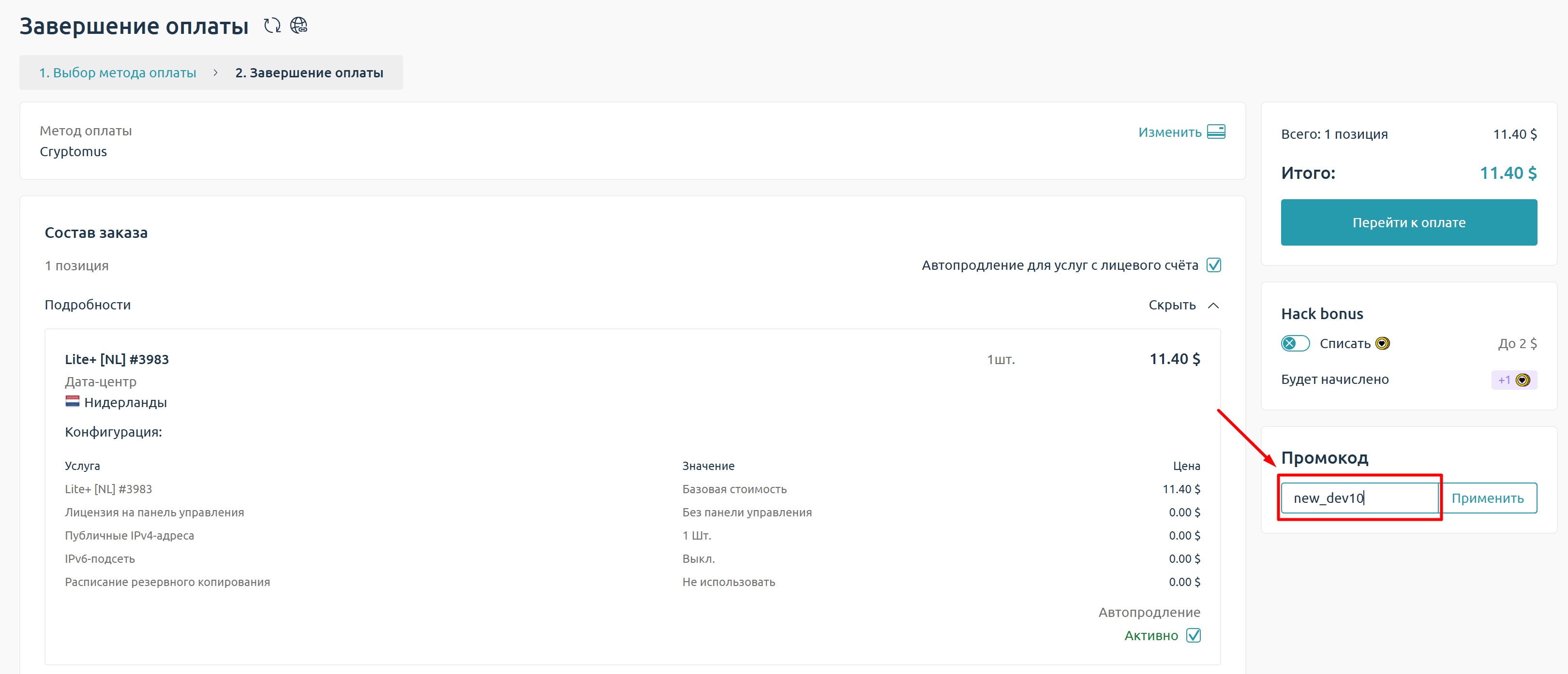
The discount applies to the first payment: you can rent a server for several months upfront if you plan to work longer.
How to choose countries for launching
If you’re running traffic to Tier-1 markets, not only speed matters but also IP relevance. LikeVPS has servers in 35 countries: from the USA and Canada to the UAE, Latin America, Asia, and Europe.
Typically, people ориент themselves like this:
- USA / Canada – base geos for major social networks.
- Germany / France / UK – often used for SaaS, mobile apps, and casual games.
- UAE / Saudi Arabia – Tier-1 with expensive traffic.
- South America – push traffic, local offers, testing grey setups.
- Latvia / Ukraine / Georgia / Israel – universal locations for trackers and traffic routing.
Servers in these geos provide decent ping, a dedicated IPv4, and a stable channel without harsh traffic limits. That’s enough for warming up, parsing, testing, and full-scale launching.
Payment in the setup: why stable cards are just as important as a VPS
Payment is just as important as the server. Even the most stable VPS won’t help if your cards get frequent declines or ad accounts reject payments. In arbitrage, you need payments to go through fast and without unnecessary blocks.
For this, many media buyers use Pay2.House – a virtual card service for Facebook Ads, Google Ads, and TikTok. The cards are suitable for scaling ad setups, support mass issuance and top-ups via USDT, and make it possible to manage spend centrally when working with multiple flows.
Summary
In arbitrage, the server isn’t a secondary tool – it’s the foundation of the entire setup. It runs the tracker, redirects, and all flow logic. If that foundation is unstable, the problems spread across the entire funnel.
LikeVPS covers the main needs of media buyers:
- provides root access and full server control;
- handles tracker and flow load;
- lets you scale without migrations;
- offers geo choices for different tasks.
If you need a working VPS for launching, testing, or infrastructure – it’s one of the services worth considering first.
Promo code for the first payment: new_dev10
Website: LikeVPS.net LikeVPS.net



 Telegram
 Email
Email









Be the first to share your opinion!
We value your feedback — share your thoughts.