


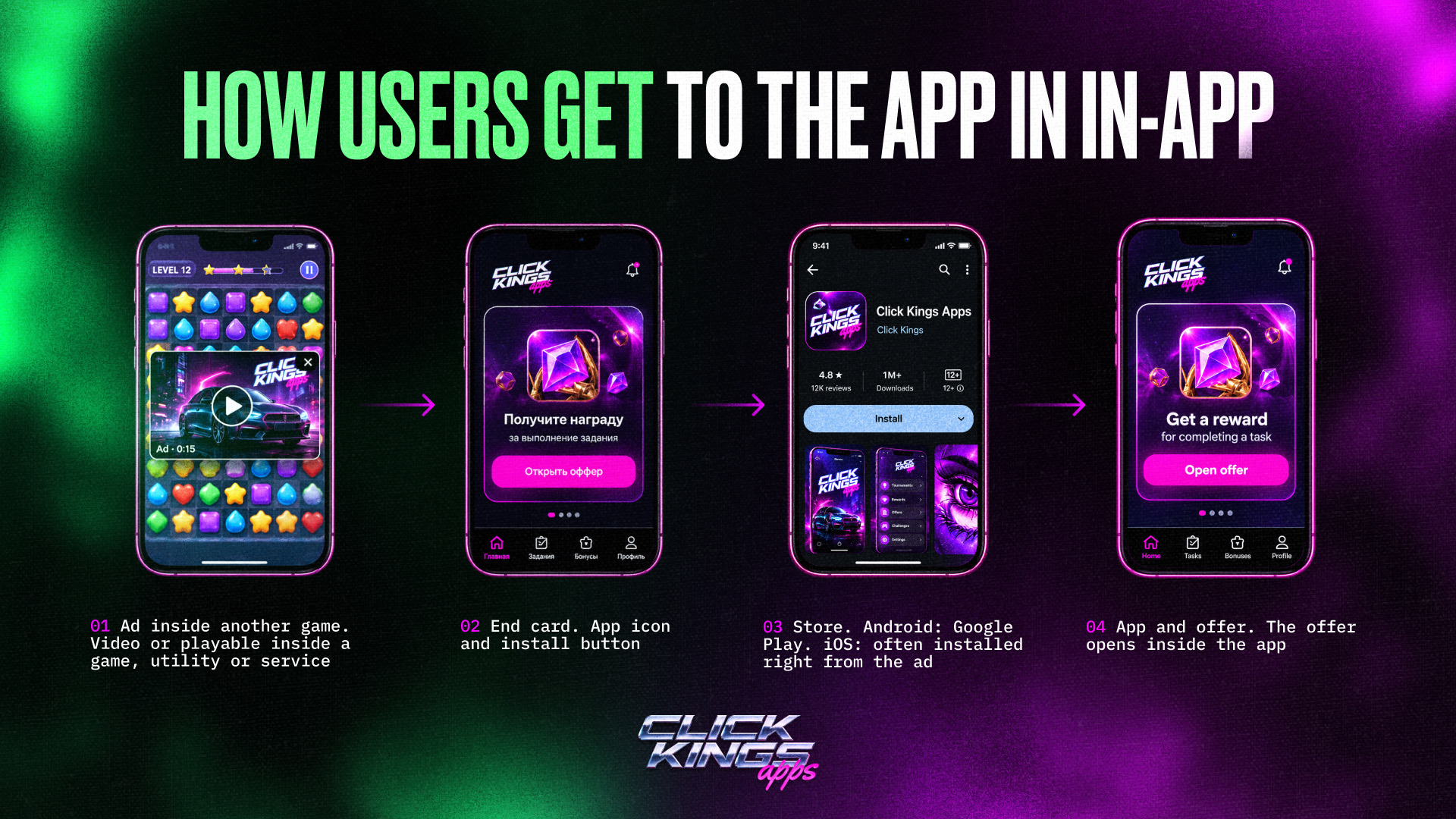
In-app advertising is promotion inside other applications: games, utilities, and services. Users are not searching for a casino; they are playing someone else’s game, see a video or playable ad, and then reach an end card with an app icon and an install button.
This is the main difference from Facebook. Unity sends traffic to something installed from an app store: an iOS or Android application. The offer opens inside the app.
The good news is that there are no separate “Unity versions” and “Facebook versions” of an app. The design, mechanics, and push notifications remain the same; only the connection to the traffic source changes. The app is integrated with Unity through an MMP such as AppsFlyer or Adjust, so the source receives all events: installs, registrations, and deposits.
What Changes for a Team Moving From Facebook
1. You Pay for Installs, Not Impressions
On Facebook, you pay for impressions while the pixel selects the audience. On Unity, you pay for installs, and the user with the highest bid receives the impression. This is a different auction and a different optimization logic.
Be prepared for in-app users to be less qualified on average than Facebook users: an install may result from an accidental tap inside someone else’s game. However, account bans are rare, and traffic tends to be more stable.
2. Publisher Lists Are the Main Tool
Instead of audience settings, in-app networks work with publisher blacklists and whitelists. The principle is the same across major in-app networks: disable placements that bring low-quality traffic and place those that generate deposits into separate campaigns.
How to read the metrics:
- Install price is useful only for comparing creatives within the same campaign.
- Monitor the conversion from install to registration: 30 installs without a single registration is a warning sign.
- At the registration-to-deposit stage, focus on deposit cost: add strong placements to the whitelist, remove unprofitable ones to the blacklist, and keep borderline placements for further testing.
- Do not overload the algorithm with restrictions, otherwise the campaign may stop spending budget.
Blacklists are built for a specific geo and not from day one: a placement needs time to collect statistics. A list created for one geo will barely work for another.
3. The Algorithm Learns From In-App Events
Instead of a pixel and CAPI, the traffic source receives events from an MMP. The minimum set includes install, registration, and deposit. Learning happens in stages, from frequent events to rare ones: first installs or registrations, then deposits, and finally ROAS. Each new event starts a new learning phase, which usually takes about two weeks.
What to know before launch:
- Unity needs not only the fact of a deposit but also its amount. Many integrations send a fixed placeholder value instead of the real amount. If a $150 payout is sent to Unity as $20, the target ROAS will need to be set at around 13%. If you set 100%, spending may quickly drop to zero. Therefore, ask your app provider in advance what amount it sends.
- If no deposit amount is sent at all, the deposit will only be counted as a paying user, and ROAS optimization will not be possible.
- For ROAS campaigns, Unity requires at least 10 paying users from Unity in each country within a 30-day cohort. The target ROAS is set on day 7.
- Events in Unity may appear with a delay of 24 hours or more. This is a feature of the platform and tracking, not necessarily an integration issue.
- ROAS and CPA campaigns optimize and spend budget differently. It is safer to launch both types and compare them on your own traffic.
If the app sends only install events, you will remain stuck at CPI and will not teach the algorithm to look for deposits.
4. The Cabinet Is Obtained Through a Provider
Beginners cannot usually get a Unity cabinet directly; it is available through providers. Terms and prices differ, so before launch, clarify which geos and verticals are allowed in the cabinet and how it can be topped up.
5. Creatives for Different Formats
In in-app advertising, users see ads inside someone else’s game, so creatives need to be adapted:
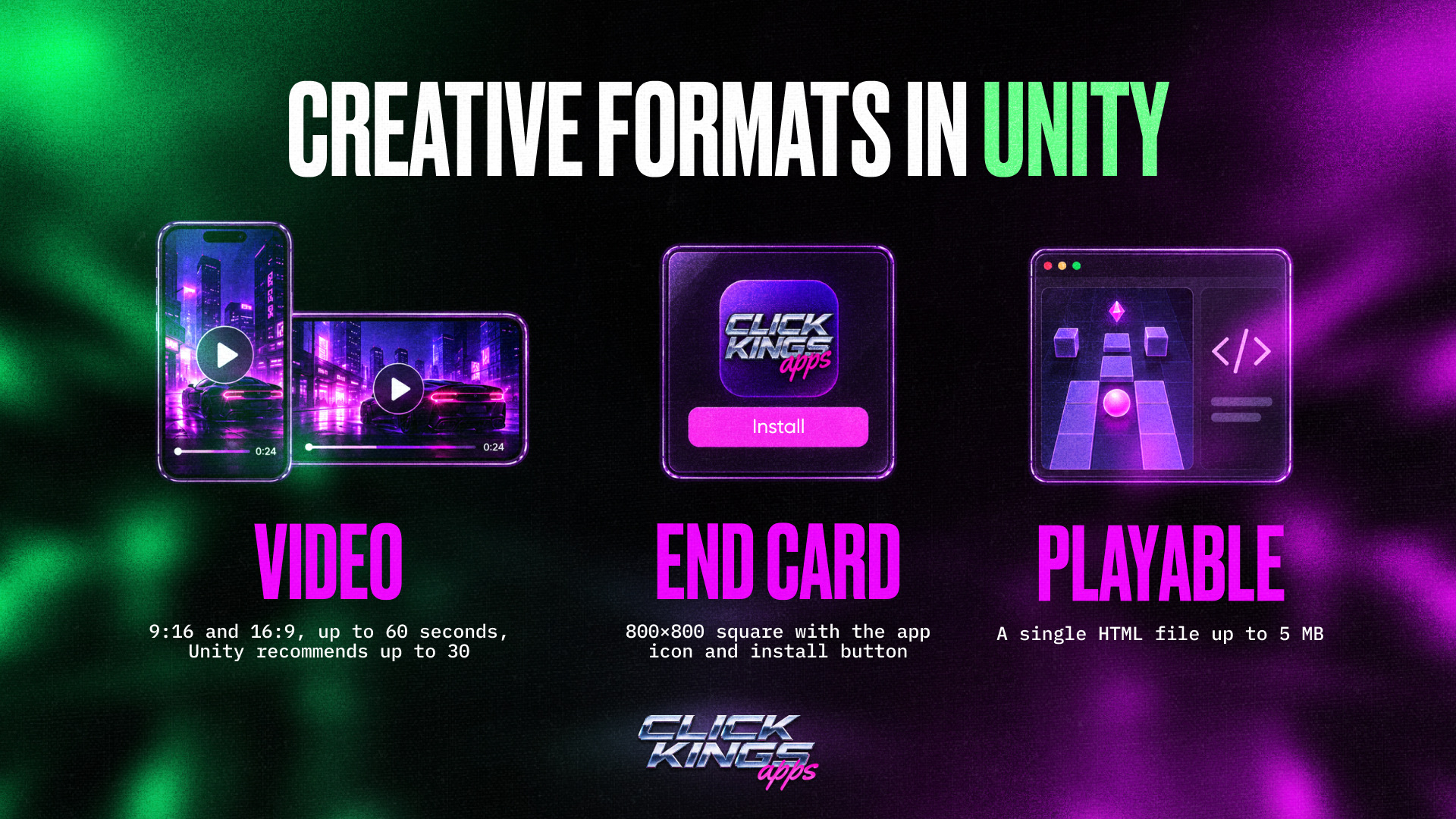
- Unity supports only 9:16 and 16:9 videos up to 60 seconds. Unity recommends videos up to 30 seconds and marks 30–60 second videos as beta, although gambling teams mostly use the longer format.
- Square Facebook videos cannot be uploaded without changes: you will need to add padding or crop them.
- The end card must be an 800×800 square.
- A playable ad is a single HTML file up to 5 MB. Playables undergo manual moderation for several days, and no more than 15 can be uploaded to an account per month. Therefore, you can start with videos and add playables after approval.
Creatives copied from spy tools may perform worse than original ones. Playables open additional placements with publishers, reduce traffic costs, and last longer than videos.
The app icon should continue the creative concept: if the creative features a Joker, the icon should also feature a Joker. Avoid child-oriented visuals, as Unity does not approve creatives aimed at minors.
6. What the Team Needs to Rebuild
According to media buyers, creatives require the most attention in in-app infrastructure. You need an in-house creative team or ongoing work with outsourcing: regular briefs, new creatives, tests, and analytics. Unity itself names creatives as a key growth lever. However, in in-app, creatives work together with the app: if the store page or download process underperforms, even a strong creative will not save the campaign. Media buyers also need to understand the auction and publisher lists, or hire specialists with in-app experience.
iOS or Android: How Platforms Differ in In-App
The launch mechanics are the same on both platforms. However, the same publisher has different IDs on iOS and Android, so optimization for each platform is built from scratch: Android blacklists cannot be transferred to iOS.
Android
- According to media buyers, about 90% of the market works with Android, and there are more proven setups for it.
- After the end card, the user lands on the Google Play page, where they see the number of installs, rating, and reviews. The store page therefore largely determines whether the user installs the app.
- The first entry into in-app is easier on Android.
iOS
- There are fewer iOS apps on the market, so competition on public cabinets is higher.
- Ready-made iOS blacklists are rare, so teams usually need to build them themselves.
- Attribution for users who do not allow tracking goes through SKAdNetwork: data arrives aggregated and delayed.
- However, iOS accounts for more than half of the audience in Tier-1 geos. These users have higher purchasing power, and some advertisers pay more for iOS traffic.
What to Choose
For a first launch, choose Android in Tier-3 geos: the entry threshold is lower and there are more ready-made setups. Launch iOS alongside Android if you work with Tier-1 geos and plan to operate long term.
Platform share and install prices vary significantly by country. Therefore, first identify where your audience is located and then choose the appropriate app version.
How Much Does an In-App Launch Cost
An in-app budget consists of several components, each with a different recipient:
- Traffic is the main budget item: from around $2,000 for Tier-3 geos to $10,000 or more for Tier-1 geos. These funds are added to the cabinet throughout the test.
- Creatives are a recurring expense: new videos are needed every one to two weeks, while playables are updated less often, but adaptation for different geos is billed separately.
- The app is paid for per install, so its cost grows with traffic volume.
- The cabinet is rented from a provider, and its cost depends on the provider’s terms.
The threshold depends primarily on the payout size. The logic is simple: to evaluate a publisher, you need to spend at least the amount of one payout on it, while traffic in each geo is distributed across thousands of placements. Below are benchmarks from media buyers’ experience; experienced teams with ready-made creatives and blacklists may have lower thresholds.
- Brazil: payout from around $25, minimum spend for conclusions around $2,000.
- Germany: 50 publishers with a payout of around $300 already require about $15,000.
- Tier-1 in general: the lower limit for a small team is around $10,000 per geo, while solid analytics may require around $30,000. The higher the payout, the higher the threshold, as in the Germany example.
With a budget of around $500, it is better to stay on Facebook: in-app will not show meaningful results at that level.
The same calculation applies to blacklists. To build a quality list for Tier-3, you need to test and exclude 50–100 publishers, spending approximately one payout on each, or around $2,000. Ready-made lists from providers are small and only filter out the worst placements.
This budget works when the team already has a working setup and an offer with strong conversion and sufficient cap, with all attention focused on one offer, one geo, and one approach. The first $500–600 usually go toward testing.
Creatives
Start with videos and end cards adapted to the source formats, then add playables over time. A good outsourced playable costs $300–400, while top developers may charge up to $700, which is roughly the price of 10 video creatives. Adaptation for other geos is billed separately.
Learning Time
Each optimization stage takes about two weeks. The first weeks are spent teaching the algorithm to find deposits, and this spending also needs to be budgeted.
Paying for Tools
With PWA campaigns, teams often need to pay for several services at once: proxies, antidetect browsers, trackers, subscriptions, and other tools. If all payments go through one card, a single decline can stop several processes at once. It is therefore more convenient to separate expenses across individual virtual cards.
With Pay2.House, you can issue multiple cards for different tasks, while teams can manage cards and budgets through My Teams. It is also better to keep a reserve on the cards covering several days of expenses: if the balance runs out during the learning phase, the campaign may stop.
For recurring expenses, Pay2.House also allows you to set up automatic card top-ups when the balance falls below a specified level.
How to Scale in In-App
Scaling is possible through cabinets: any number of your Unity Ads cabinets can be connected to one app. The more cabinets and media buyers involved, the more important it becomes to see who is spending what.
However, directly copying a working campaign into another cabinet does not always work. A copy may spend several times less than the original because it has no history, while the original, using the same geo and creatives, outperforms it in the auction. Therefore, it is better to separate copies by geo or creative approach and treat them as tests rather than guaranteed scaling. The original working campaign is safer to scale gradually, with small budget increases, to avoid disrupting its learning.
Do not rely on a single app either. In in-app, the app is part of the overall setup: the store page, design, and loading speed all affect conversion. Launch with several apps at once and move budget to the ones that show the first results.
In the long run, look for spend deals, meaning agreements under which the advertiser covers traffic expenses plus a commission. If traffic meets the advertiser’s KPIs, they pay for all traffic costs plus a fee. Usually, the advertiser first asks you to work on CPA and offers this model once they like the traffic. Such agreements should be made directly with the advertiser; going through an affiliate network makes no sense.
What to Check Before Launch
- The cabinet is connected to the app, and the app is visible in Unity.
- The Game ID in the Unity cabinet matches the one in the MMP. Otherwise, the campaign will not start.
- Test install, registration, and deposit events have passed through the entire tracking chain.
- You know which deposit amount Unity receives: the real amount, the offer payout, or a fixed value. Set the target ROAS accordingly.
- The time zone in Unity reports matches the one in the MMP. By default, Unity uses UTC.
- The icon matches the creative, while the app and offer are localized for the target geo and use local currency.
- The payment method for topping up the cabinet and paying for tools has been tested, and its limits are sufficient for the entire test budget.
How It Works With Click Kings Apps
Click Kings Apps, payments are handled by Pay2.House, and creatives and patience during the learning phase are on your side.
Ready to test in-app with your offers? Register with Click Kings Apps. For any questions, contact support: @sup_clickkings. To follow service updates, new case studies, and useful materials, subscribe to our Telegram channel.



 Telegram
 Email
Email









Be the first to share your opinion!
We value your feedback — share your thoughts.